Features
Everything a printed QR code needs.
Change where it points, make it look like your brand, check that it scans, and see how it performs — without tracking the people who scan it.
01 · Editable forever
Change the destination. Keep the print.
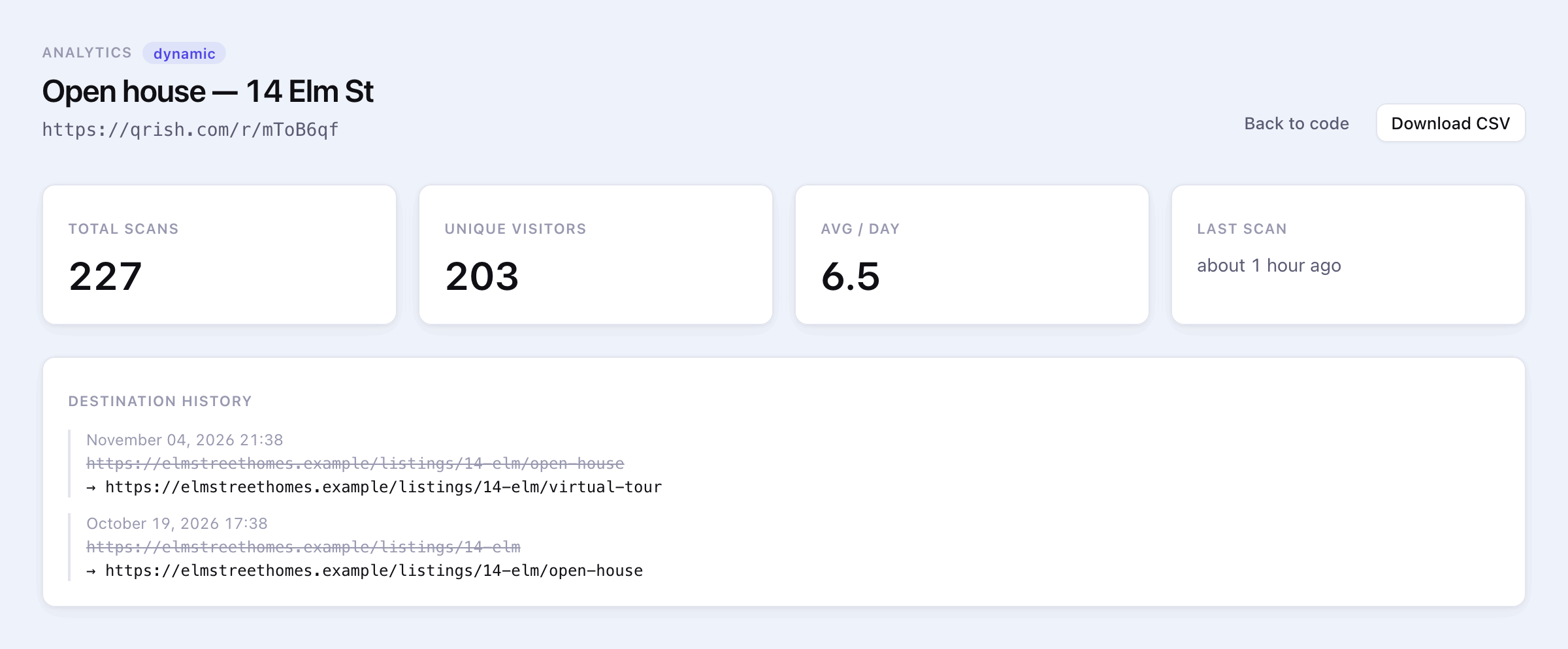
A dynamic code encodes a short qrish link, not your URL. Point it somewhere new whenever you like — the code on the menu, flyer or box never changes. Every edit is logged, and one code can serve different destinations to different people.
-
Dynamic codes
Edit the destination of a link or landing-page code at any time, without reprinting.
-
Destination history
Every change is recorded old → new, with a timestamp, so you always know where a code pointed and when.
-
UTM builder
Add source, medium, campaign, term and content. Applied at redirect time, with a live preview of the final URL.
-
A/B split tests
ProSend scans to several destinations by weight. Each scan is attributed to the variant that served it.
-
Rules-based routing
ProRoute by device (mobile, tablet, desktop), language, day of the week or time of day — from one printed code.
-
Static codes too
Prefer no redirect? Static codes hold their content in the pattern itself and never expire.
02 · Design & scannability
On brand, and checked before you print.
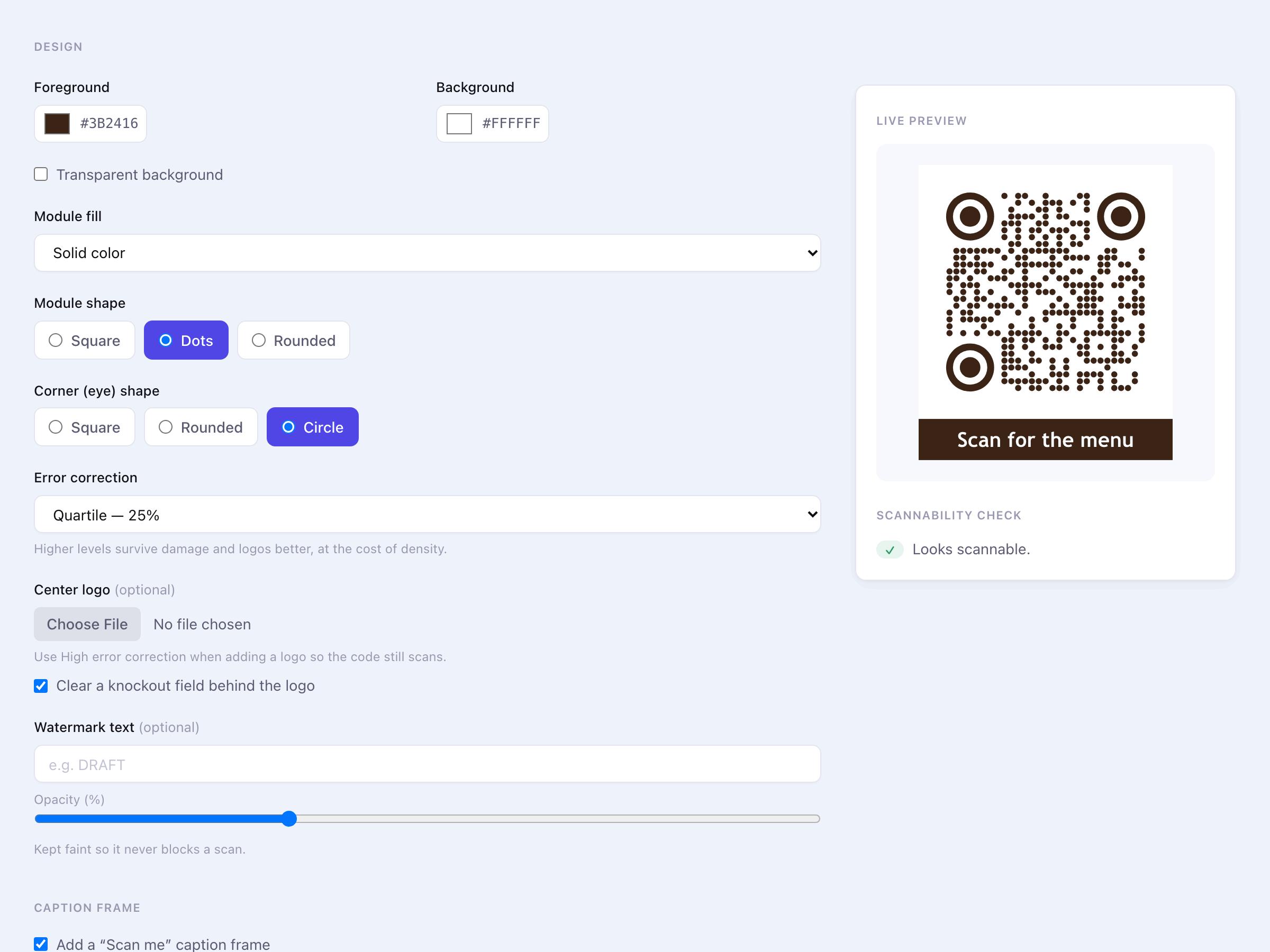
Style the code to match your brand and watch it render as you type. A live scannability check flags low contrast, inverted colors and a logo that hides too much — before the code reaches the printer.
-
Live scannability check
Warns on low contrast (including the weakest stop of a gradient), inverted colors, logo vs. error correction and overly dense data.
-
Colors and gradients
Any foreground and background color, a transparent background, and linear or radial gradients.
-
Module and eye shapes
Square, dots or rounded modules. Square, rounded or circle corner eyes.
-
Center logo
Upload PNG, JPEG, SVG or WebP. Logo knockout clears the modules behind it for a clean edge.
-
Caption frames
Add a “Scan me” call to action as a bar or a framed card, in your color and one of five fonts.
-
Watermarks
Tile your own subtle text across the code, capped at 25% opacity so it still scans. Free-plan dynamic codes carry the qrish mark instead.
-
Error correction
Choose L, M, Q or H. Raise it when you add a logo — the check tells you when you need to.
-
PNG and SVG export
Download a 1024 px PNG or a vector SVG for print, caption frame included.
03 · Privacy-first analytics
We count scans, not people.
See how each code performs without tracking the people who scan it. The IP address is used in memory and then discarded — never stored. Unique scans come from a hash that rotates every day.
How we count scans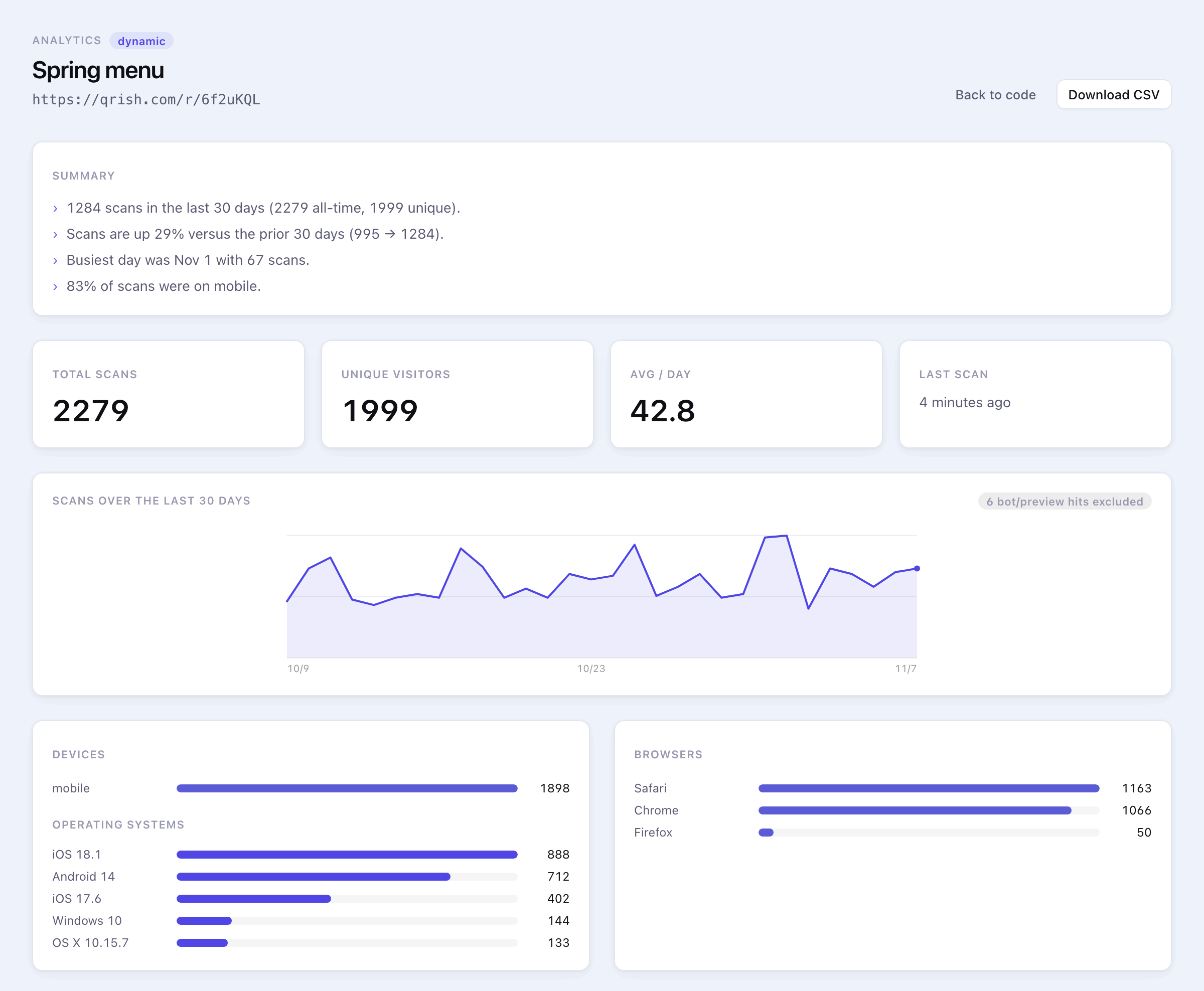
-
Total and unique scans
Unique visitors are counted with a daily-rotating hash, never a stored IP address.
-
Device, OS and browser
Know whether people scan on iPhone or Android, phone or tablet — from the browser’s user agent.
-
Scans over time
A daily chart and recent-scan list that refreshes while the page is open.
-
Bots filtered out
Link previews and crawlers are flagged and kept out of your counts.
-
Conversational insights
Plain-language summaries for every code. Computed on our servers — no external AI service.
-
Campaign comparison
ProAn Insights page that compares campaigns side by side, with a summary and one chart.
-
CSV export on every plan
Download the scans of a code — the last 30 days on Free, full history on Pro. Exports never include IP addresses or visitor hashes.
-
Public stats page and badge
Opt in per code to share a public stats page or embed a live scan-count badge.
04 · Landing pages
No website? Point the code at a page we host.
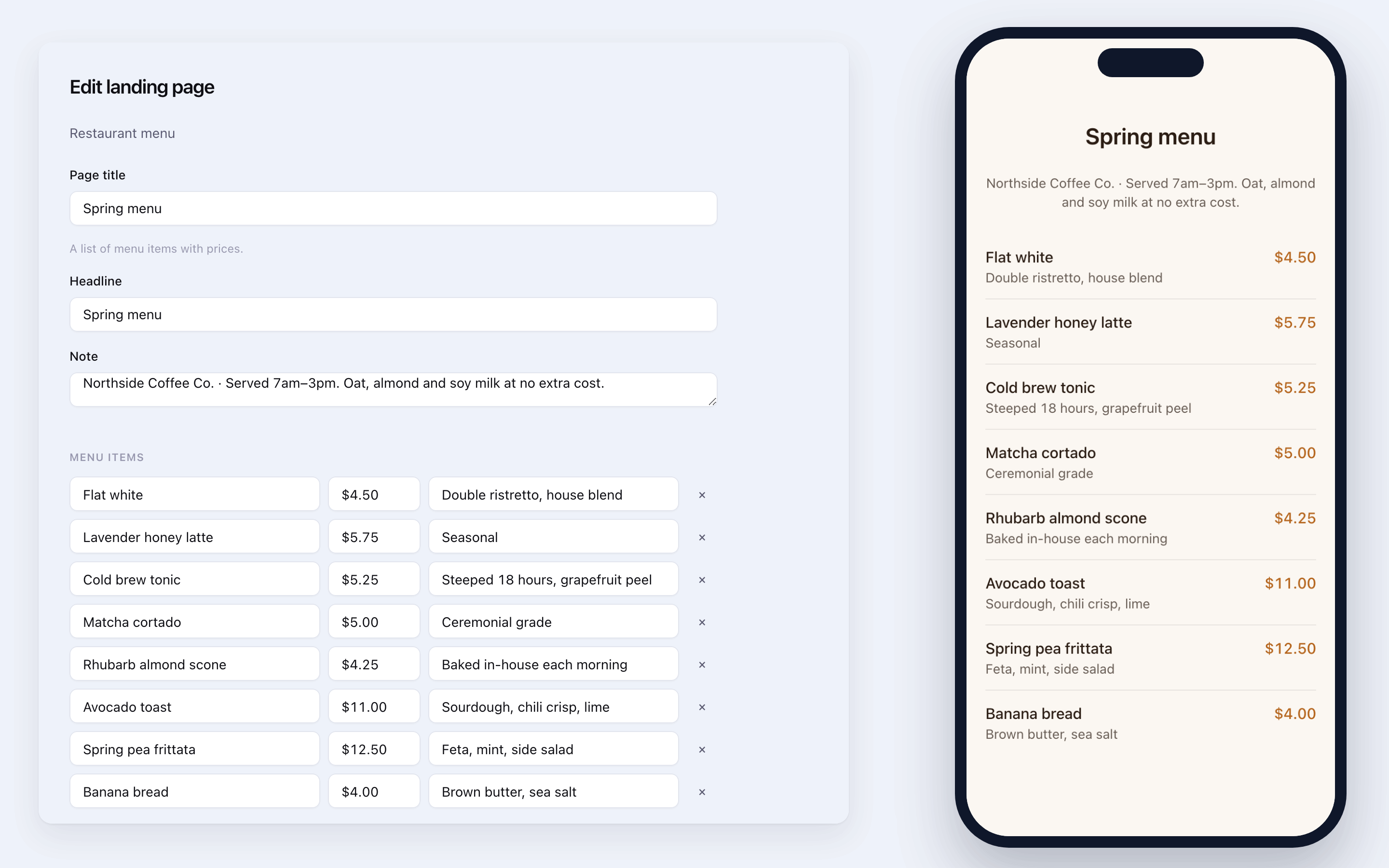
Build a mobile page in minutes and link a dynamic code to it. Twelve page types cover menus, coupons, link-in-bio, galleries, files and more. Edit the page at any time — the printed code stays the same.
-
Link-in-bio
A list of links — the classic bio page.
-
Social links
Send people to all your social profiles.
-
App Store smart redirect
iPhone users go to the App Store, Android users to Google Play.
-
Restaurant menu
Menu items with prices you can update daily.
-
Coupon
A redeemable code with its terms.
-
Business page
Your business at a glance.
-
Profile / business card
A digital contact card.
-
Image gallery
Upload images and show them in a grid.
-
Video
Embed a hosted video by URL.
-
PDF viewer
Share a PDF that opens or downloads.
-
Audio
Play an uploaded audio file.
-
Feedback
Point people to your review or feedback form.
-
Retargeting pixels
ProOptionally add a Meta Pixel, Google Ads or GA4 ID. They load on that landing page only — never on plain redirects.
05 · Teams & developers
Built for teams, open to developers.
Run every client or brand in its own workspace and invite the people who need access. When you outgrow clicking, generate codes in bulk, call the REST API and get a signed webhook on every scan.
Read the developer docs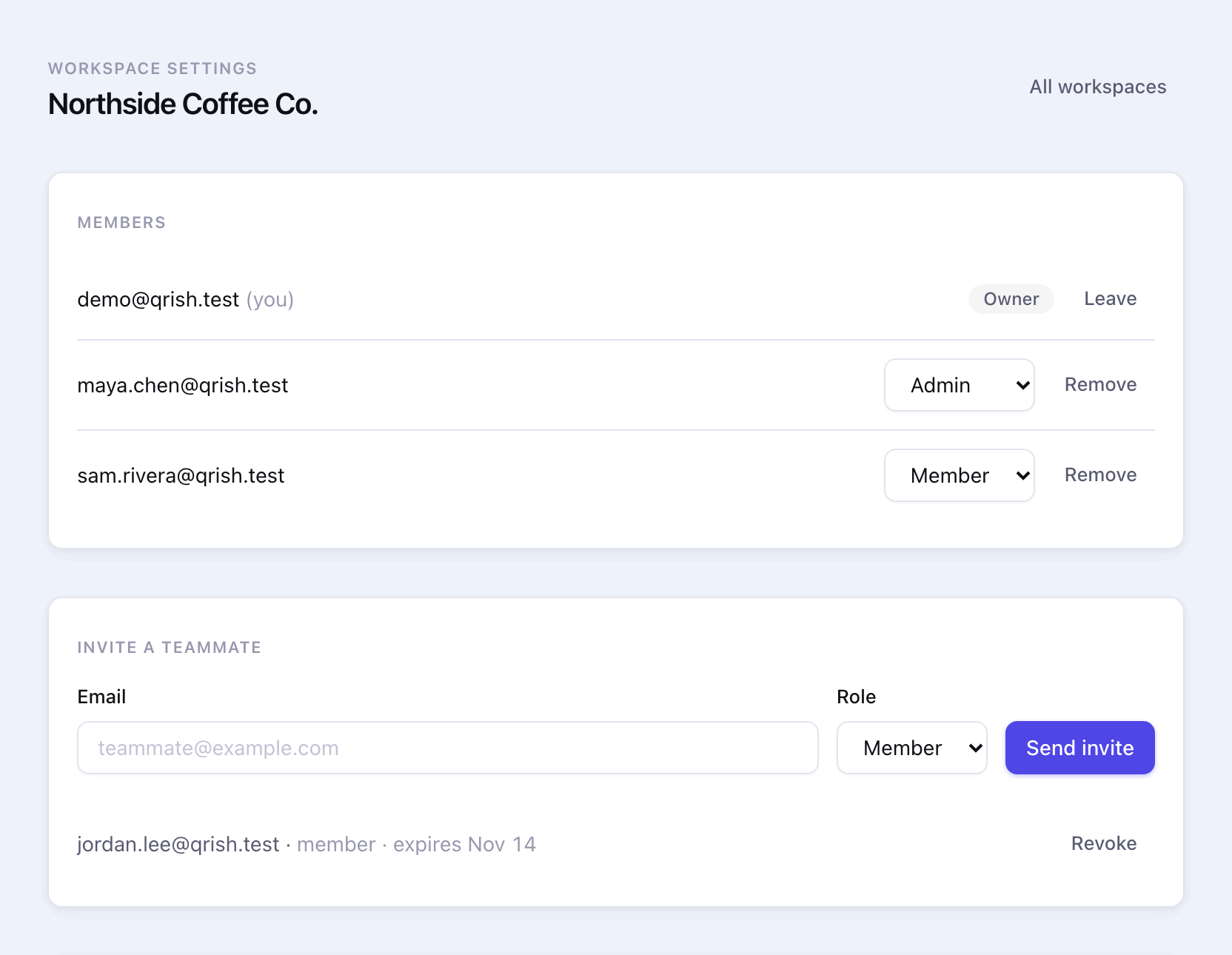
-
Workspaces
Keep each brand or client separate. Every code records who created it.
-
Roles and invitations
ProOwner, admin and member roles. Invite teammates by email — 5 seats on Pro.
-
Bulk generation
ProUpload a CSV of up to 5,000 rows and download every code in one ZIP.
-
REST API
ProCreate, update, delete and read analytics for codes over /api/v1 with a workspace token.
-
Signed scan webhooks
ProAn HMAC-SHA256 signed scan.created POST for every human scan, with a delivery log.
-
Zapier / Make feed
ProPoll a workspace scan feed, or catch webhooks, to wire scans into Zapier, Make or n8n.
-
Signed links
ProTamper-proof redirect links that can expire. Or require a signature on the printed code itself.
-
GS1 Digital Link
Encode a GTIN with batch/lot, serial and expiry as a GS1 Digital Link URI (URI Syntax 1.6.0).
Code types
All 21 code types, on every plan.
Nine types encode their content directly. Twelve open a landing page we host. Link and landing-page codes can be dynamic, so you can change them after printing.
Direct codes
9 types-
Link
Any website or URL.
-
Text
Plain text, shown on scan.
-
Email
A pre-addressed email with subject and body.
-
Call
Dial a phone number.
-
SMS
A text message, pre-filled.
-
WhatsApp
Open a chat with a pre-filled message.
-
Wi-Fi
Join a network without typing the password.
-
vCard
Save a contact in one tap.
-
Event
Add an event to the calendar.
Landing pages
12 types-
Social links
All your profiles on one page.
-
App Store smart redirect
The right store for each phone.
-
Image gallery
A grid of uploaded images.
-
Video
A hosted video, embedded.
-
PDF viewer
A PDF that opens or downloads.
-
Link-in-bio
A list of links.
-
Restaurant menu
Items and prices.
-
Audio
An uploaded audio file.
-
Business page
Your business at a glance.
-
Coupon
A code with its terms.
-
Feedback
Your review or feedback form.
-
Profile / business card
A digital contact card.
Plus GS1 Digital Link — product codes that carry a GTIN, batch, serial and expiry, readable by a store’s scanner and a shopper’s phone.
Packaging & GS1Pro marks the features on the Pro plan. Pro also lifts the Free limits (3 dynamic codes, 1 landing page, 30 days of scan history, one seat) and removes the qrish mark from dynamic codes. Everything else is on Free.
Compare plansMake your first code in under a minute.
Free plan, dynamic codes included, no credit card.